The self-service welcome system will be launched tomorrow. Come and accept this operation guide!


Develop a sense of independence, independently cope with the new university life, and start from online self-service registration!
From August 10th, Huazhong Agricultural University opened the online self-service orientation system for freshmen for the fifth time. Freshmen of Grade 2019 can log on to the self-service orientation system of Huazhong Agricultural University and register online.
Q: What procedures and procedures can freshmen go through in the orientation system?
A: Class of A:2019 freshmen fill in personal information online by logging into the school self-service orientation system and go through the online registration procedures. Facing freshmen and their parents, Yingxin.com provides various services, such as notice announcement, learning and evaluation of online safety and national defense knowledge, basic information collection, military training clothing selection, green channel handling, apartment supplies purchase, online payment, handling details and online leave.
Q: What are the precautions for freshmen when using the orientation system?
A: When using the orientation system, freshmen should carefully check the prompt information such as "operating instructions", "notices and announcements" and "frequently asked questions", and be familiar with and master the basic requirements, handling procedures and precautions of online operation required for registration;
Freshmen should strictly follow the notification requirements of the "Guidance Notes for Admission" and complete the registration on the Welcome Online from August 10th to August 26th. In case of special circumstances, if you can’t complete the registration online or the registration is unsuccessful, you should get in touch with the counselors, teachers and corresponding volunteers of your college in time and ask for help;
Freshmen should take good care of their login account and password when logging in to the orientation system, to guard against the disclosure of sensitive personal information and ensure the safety of personal information.
In order to facilitate freshmen to be familiar with the self-service orientation system, we specially prepared a guide for you to fill in the self-service orientation system.
Guide to the operation of undergraduate self-help orientation system
Welcome system access address is:
http://yingxin.hzau.edu.cn
01
How to log in to the self-service welcome system?
(Take undergraduates as an example)
1, computer access
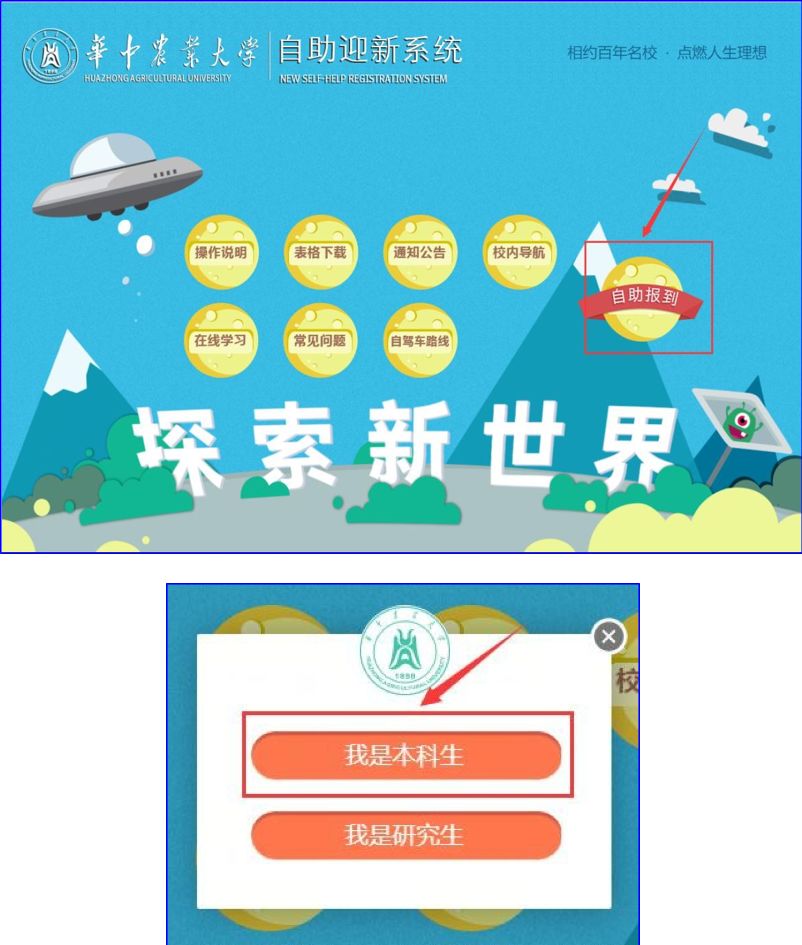
Step 1: Browser access: http://yingxin.hzau.edu.cn (advanced browser is recommended), click the "self-check-in" button and select "I am an undergraduate", as shown in the figure below:
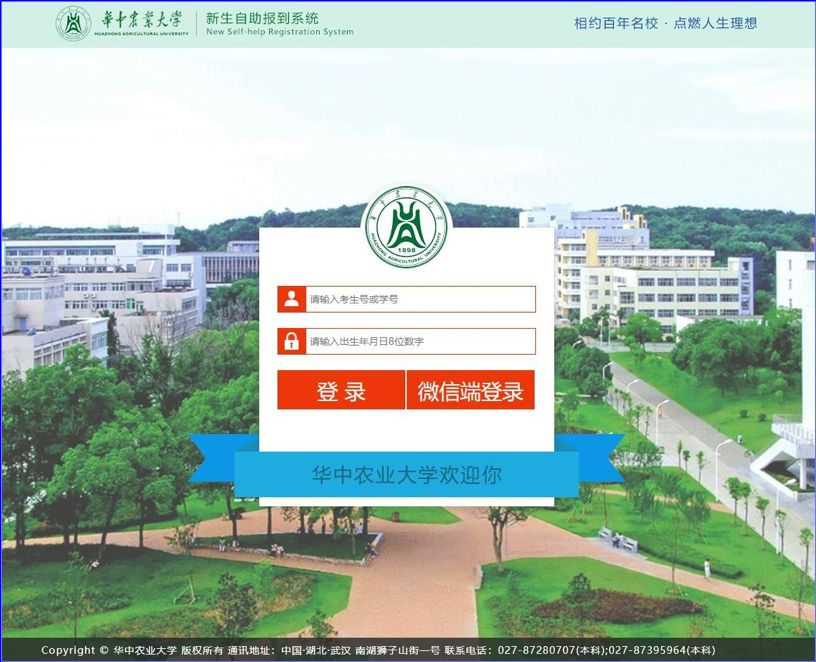
Step 2: After entering the user name and password, click the login button (user name: examinee number or student number, initial password is 8 digits of date of birth), as shown in the figure below:
2. Mobile phone WeChat access
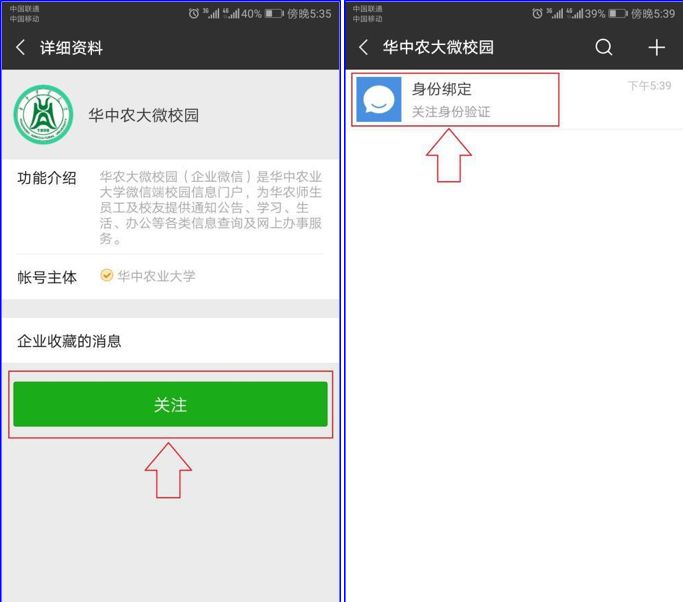
Step 1: WeChat scan code pays attention to the official enterprise number of "Huazhong Agricultural University micro-campus", as shown in the figure:
Step 2: Click the "Follow" button. After entering the WeChat Enterprise number, click "Identity Binding", as shown in the figure below:
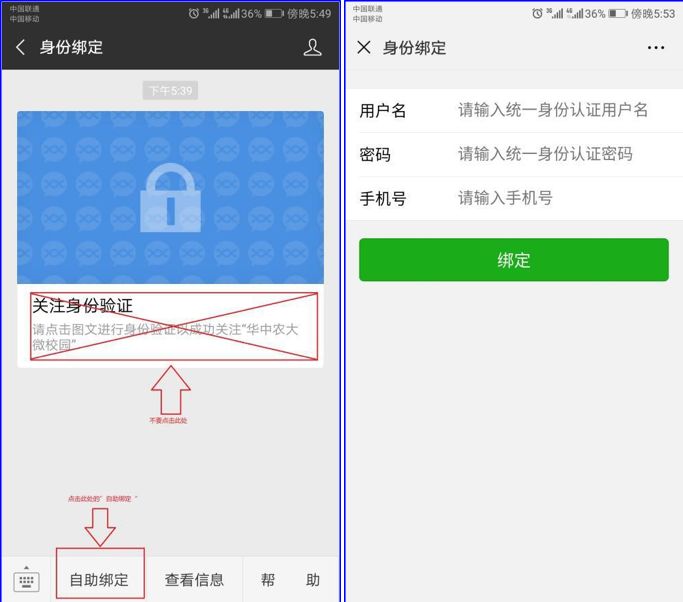
Step 3: Click "Self-service Binding" at the bottom of the interface, enter the user name, password and mobile phone number (the user name is the student number, and the initial password is hzau+ 8 digits of the date of birth, totaling 12 digits), and click the "Binding" button, as shown:
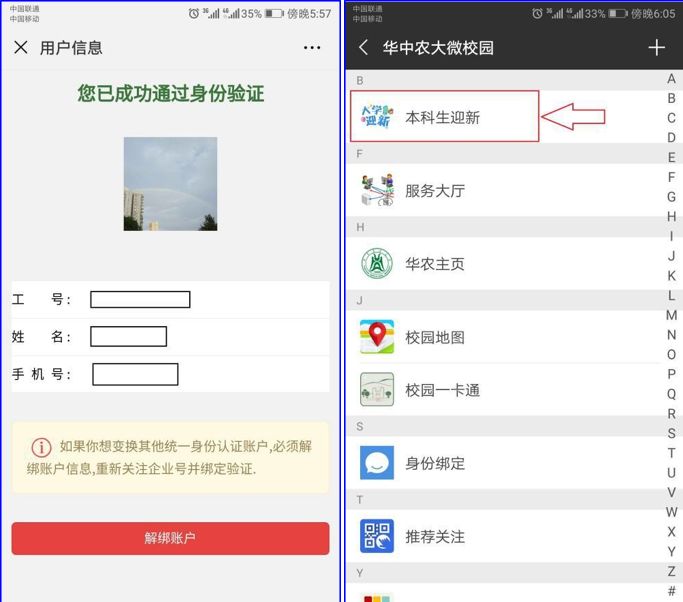
Step 4: After the binding is successful, re-enter the enterprise WeChat homepage and click "Undergraduate Welcome" to enter the mobile phone WeChat terminal of the welcome system, as shown in the figure below:
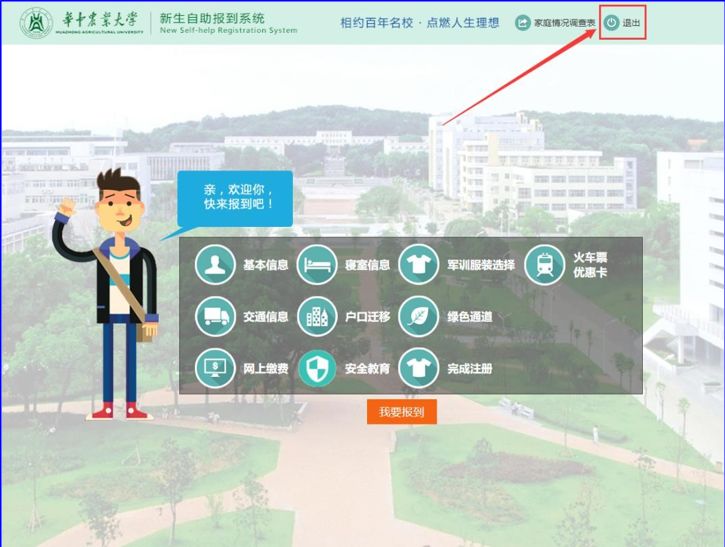
3. Exit the system
02
Self-service orientation system operating instructions (computer side)
1, for the "basic information" link
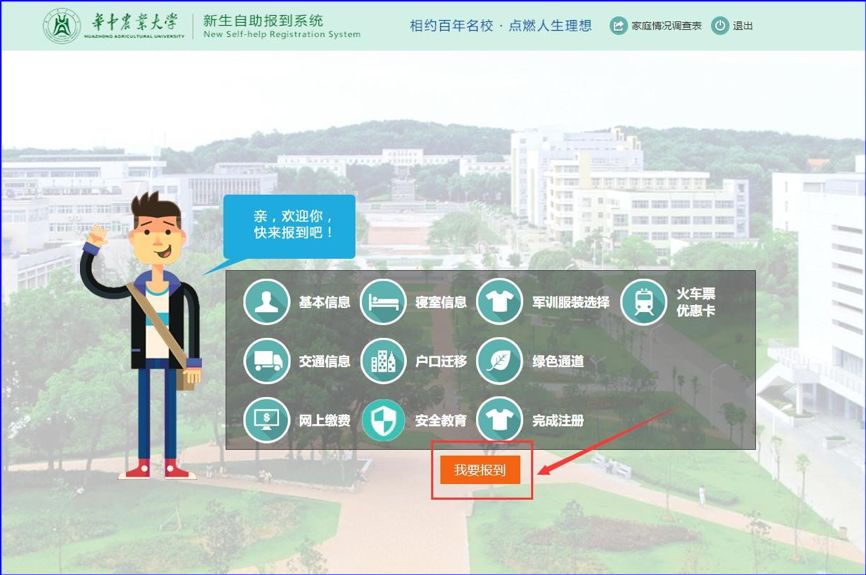
Step 1: After logging into the system, click "I want to check in", as shown:
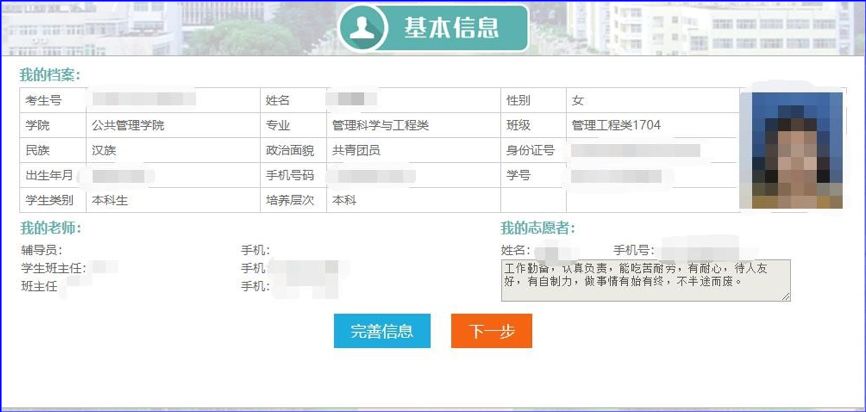
Step 2: Check the related information of "My File", "My Teacher" and "My Volunteer", and click "Perfect Information" to improve personal basic information, as shown in the figure below:
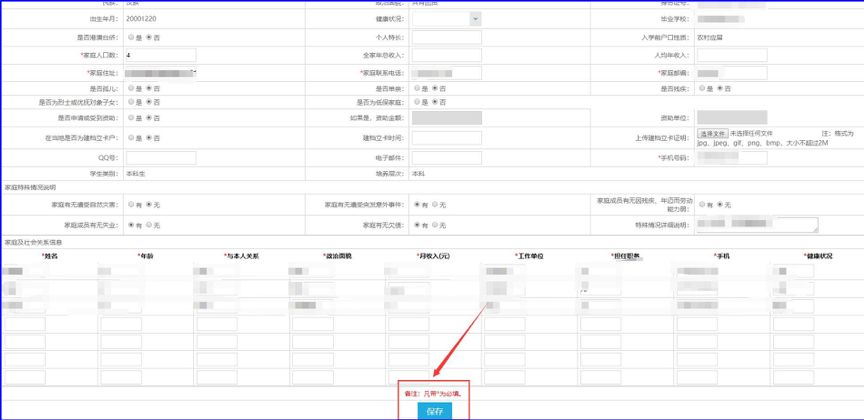
Step 3: Click Perfect Information to open a new page. Some fields in the page are automatically generated by the system and do not need to be filled in by users, and the fields marked with * are required. Please fill in a valid number for "mobile phone number" information, so that our welcome volunteers can contact you in time.
2. Handle the "Dormitory Information" link
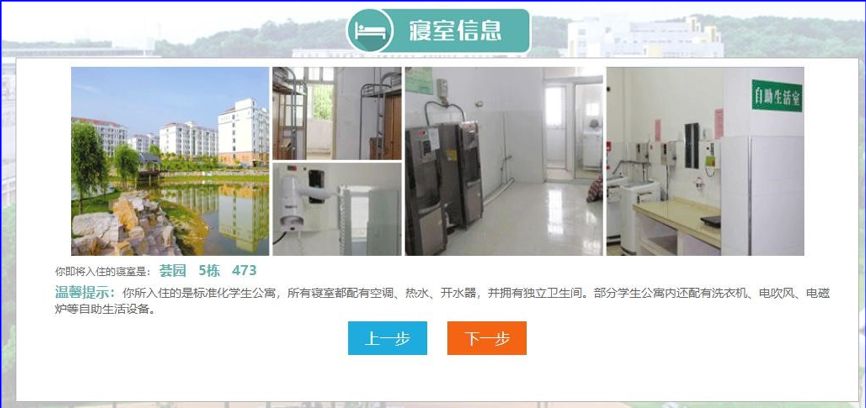
Click [Next] or [Dormitory Information] to enter the Dormitory Information tab, where you can see the dormitory picture, your dormitory address and the basic configuration of the dormitory, as shown:
3, handle the "military training clothing selection" link.
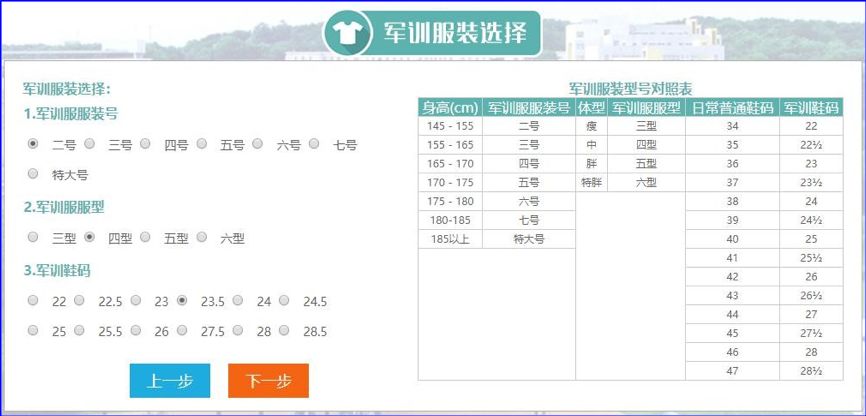
Click [Next] or [Military Training Clothing Selection] to enter the military training clothing selection tab page. On this page, you must select the military training clothing number, military training clothing type and military training shoe size, and you can compare the military training clothing type comparison table on the right, as shown in the figure:
4. Handle the "train ticket discount card" link.
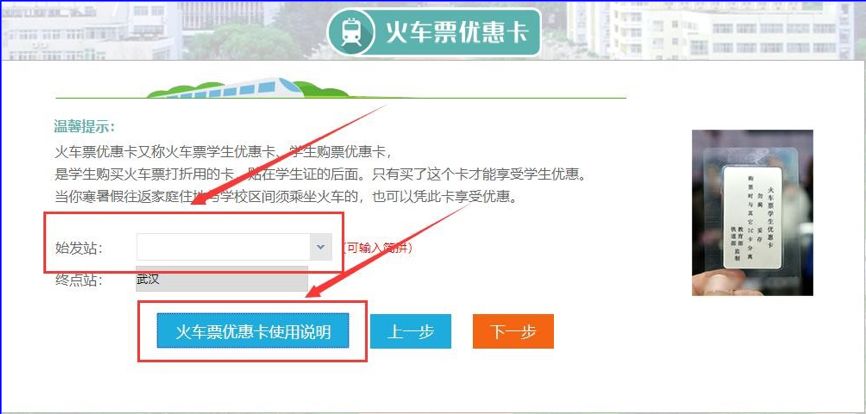
Click [Next] or [Train Ticket Discount Card] where you need to fill in the departure station and terminal station. You can click the button [Instructions for Use of Train Concession Card] to view the relevant usage regulations.
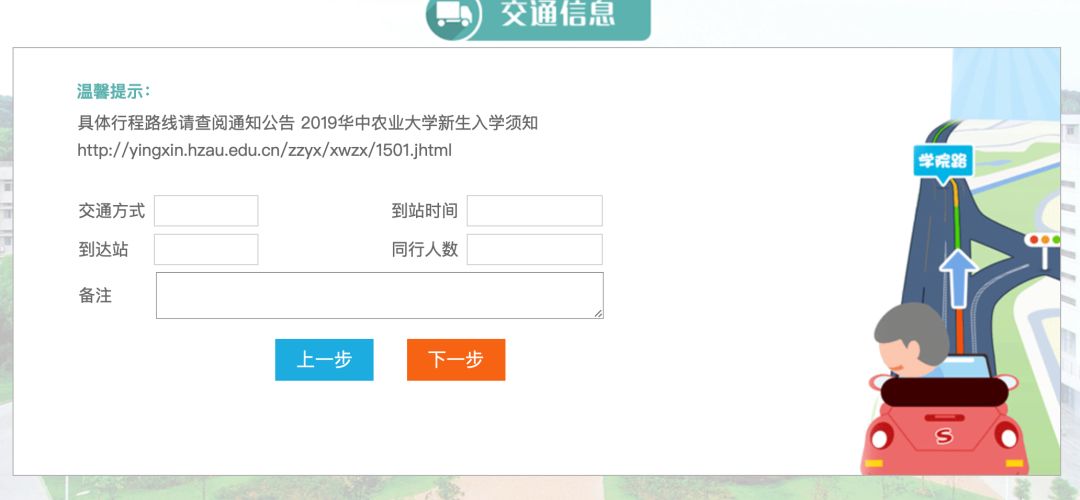
5. Handle the "traffic information" link
Click Next or Traffic Information to enter the traffic information tab. Fill in your transportation mode, arrival time, arrival station, and the number of peers, so that we can master your transportation information.
In particular, I would like to remind all freshmen to pay attention to:
This year, there is no orientation point in the railway station and airport. Freshmen can come to school by means of transportation after arriving in Wuhan. The specific route is as follows:
Tianhe Airport: Take Line 2 (in the direction of Fozuling) and get off at Baotong Temple Station, exit A, and take Bus No.576 to Huazhong Agricultural University Station on Luoshi South Road (get off at the footbridge) to get to the school.
Wuchang Railway Station: Take the west exit to the bus station of Wuchang Railway Station on Zhongshan Road through the underground passage, and take bus No.571 to Huazhong Agricultural University Station on Luoshi South Road (get off at the footbridge) to reach the school.
Wuhan Railway Station: 1. Take Metro Line 4 (towards Jinkoukou) and get off at Wuchang Railway Station. The subsequent route is the same as Wuchang Railway Station. 2. Take Metro Line 4 (in the direction of Huangjinkou) and change to Metro Line 2 (in the direction of Foziling) at Hongshan Square Station or Zhongnan Road Station. Get off at Baotong Temple Station and exit from Exit A. The subsequent route is the same as that of Tianhe Airport.
Hankou Railway Station: 1. Take Metro Line 2 (in the direction of Fozuling) and get off at Baotong Temple Station and exit from Exit A. The subsequent route is the same as that of Tianhe Airport. 2. When you leave the station, you can take bus No.703 and No.411 to Yingwu Avenue Qintai Station, and then take bus No.571 to Shinan Road Huazhong Agricultural University Station (get off at the footbridge) to get to the school.
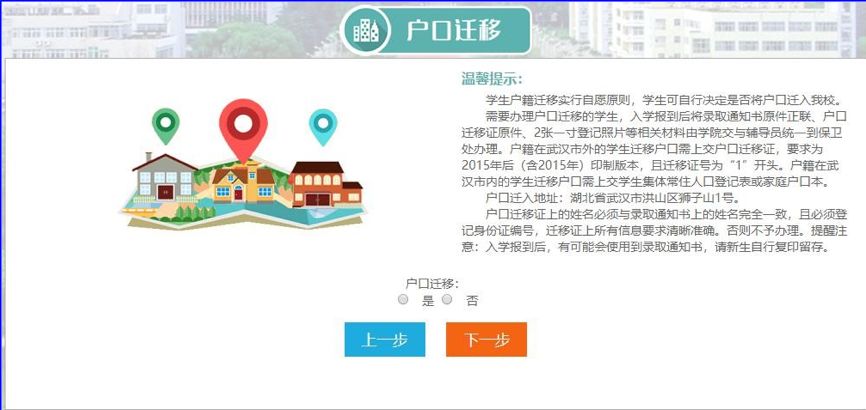
6. Handle the "account migration" link.
Click Next or Account Migration to enter the account migration selection page, select Yes or No, and click Next to automatically save the information.
7, for the "green channel" link.
If the students who need to apply for the Green Channel cannot pay all the fees due to various reasons, they can choose [Student Credit Student Loan] and [Student Credit Student Loan] according to whether they have applied for it or not.
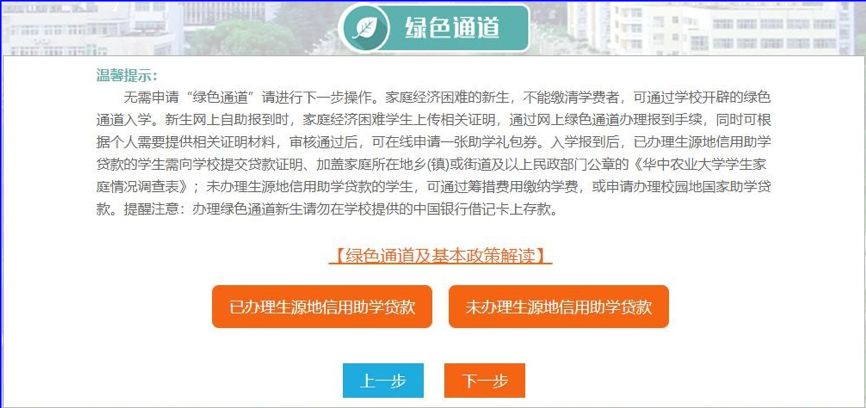
Note: For details about the basic policies of green channel and student credit loan, please click [Interpretation of Basic Policies of Green Channel and Student Credit Loan].
Students who have applied for student-origin credit student loans click [Student-origin credit student loans have been applied for], and a new page will pop up. You need to fill in the check code of the loan electronic receipt, the student origin of the loan, the loan application amount and other information, and upload the electronic version of the "acceptance certificate" or "receipt" file. Please click the Save button after completing it.

For students who have not applied for the student-origin credit loan but cannot pay immediately due to family difficulties, please click 【 Not applied for the student-origin credit loan 】, a new page will pop up, fill in the deferred payment amount and reasons, and upload a scanned copy of the family economic situation questionnaire as required (pay attention to the picture format, the size is not more than 500kb), and click the Save button after completing it.
Students who don’t need to apply for the green channel, please click next directly.
Remarks: The school staff will examine and approve the green channel application in time. Freshmen are requested to pay attention to the examination and approval status in time.
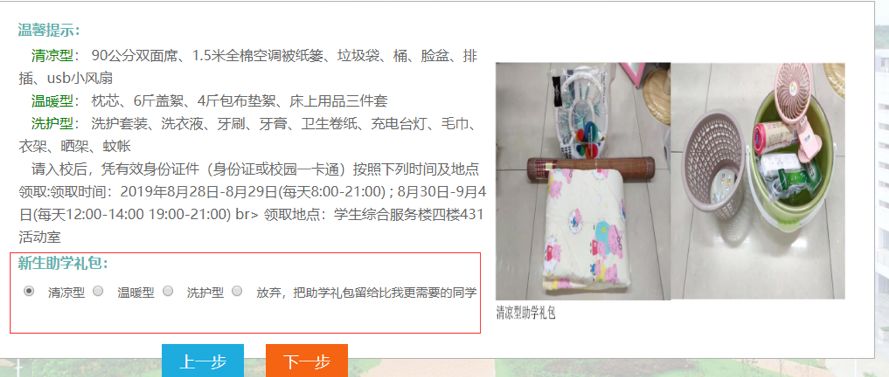
8. Handle the "Student Aid Package Link"
After applying for the "green channel" link, students (a few students) with relatively poor family economy can also apply for the "student aid package" link and select the student aid package.
9. Handle the "online payment" link
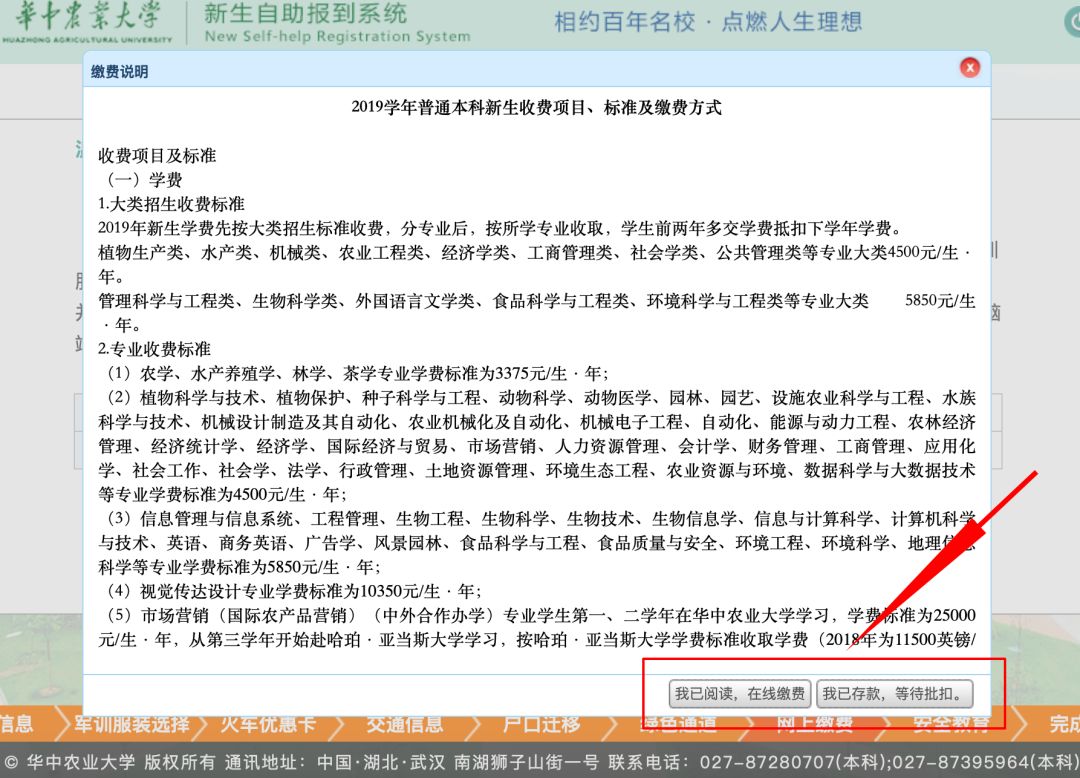
Click [Next] or [Online Payment] to enter the payment page, and click [I want to pay] to enter the online banking charging system of Huazhong Agricultural University to complete the payment.
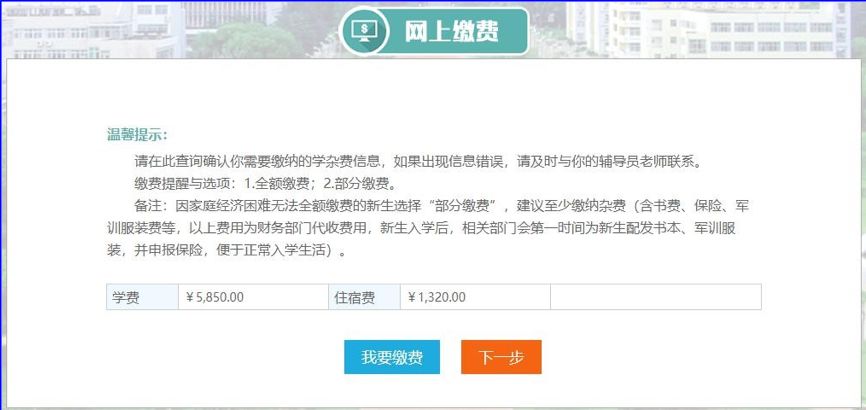
Payment methods are divided into the following two types:
(1) Online banking system pays fees independently. Students can log on to Huazhong Agricultural University’s self-service registration system (http://yingxin.hzau.edu.cn/) for online payment from August 10th, 2019, and support UnionPay, WeChat and Alipay.
(2) Bank card approval. The school provides students with China Bank debit card (that is, the bank card issued with the letter of admission, which is the only bank card for students to issue scholarships during their school days, so please keep it properly). Students can activate the bank card at the nearest China Bank before August 26, 2019 and deposit the full amount of funds, which will be deducted by the school through the bank.
Please note that the school payment methods are limited to the above two. ※.
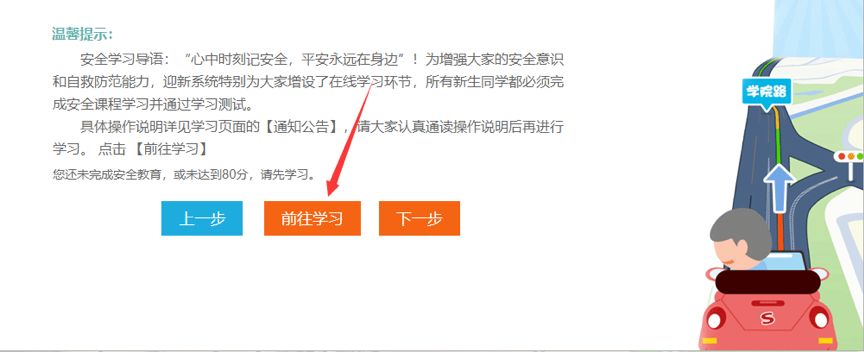
10. Handle the "safety education" link.
Always remember safety in your heart, and peace will always be around! In order to enhance everyone’s safety awareness and self-help and prevention ability, the orientation system has specially added an online learning link for everyone, and all freshmen must complete the safety course and pass the learning test.
For the specific operating instructions, please refer to the [Notice Announcement] on the learning page. Please read the operating instructions carefully before learning. Click [Go to Study].
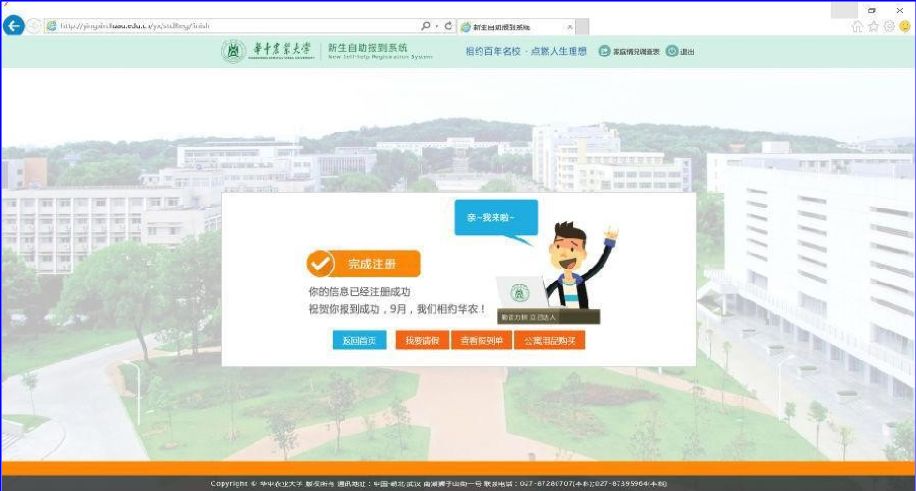
11. In the "Complete Registration" stage, if the freshmen have completed all the steps, click [Complete Registration], and the system will enter the prompt page of successful registration, as shown in the following figure. If you enter this interface, congratulations on your successful registration.
If the steps are not completed, the system will give corresponding prompts, such as incomplete information and unpaid fees, as shown in the following figure.
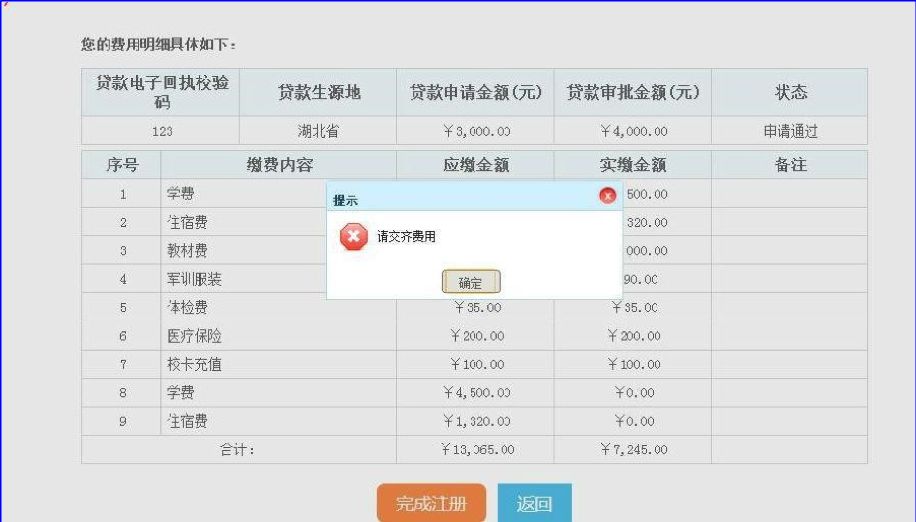
Note: If the fees have not been paid in full, click [Complete Registration] and the system will prompt that the fees have not been paid in full, and the registration can only be completed after the fees have been paid in full. For students who have applied for the green channel, the system will only consider the fees paid when the "approved amount"+"online payment amount" is greater than or equal to the total payable amount. Otherwise, the registration is unsuccessful, so students who apply for the green channel, if the approved amount is not enough to cover all the expenses, please pay the difference.
12. Other services
(1) I want to ask for leave
If the registered freshmen can’t get to school in time because of something, click [I want to ask for leave] to enter the online leave interface. Fill in the reasons for leave, the expected time of arrival at school, the number of days of leave, and upload relevant supporting documents. Click [Save] button.
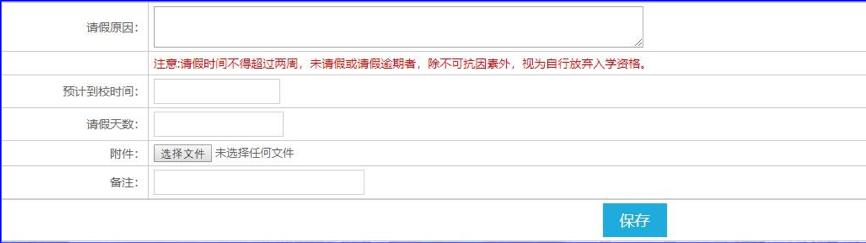
Note: The leave time shall not exceed two weeks. Those who fail to take leave or take leave overdue shall be deemed to have given up their admission qualification on their own, except for force majeure.
(2) Purchase of apartment supplies
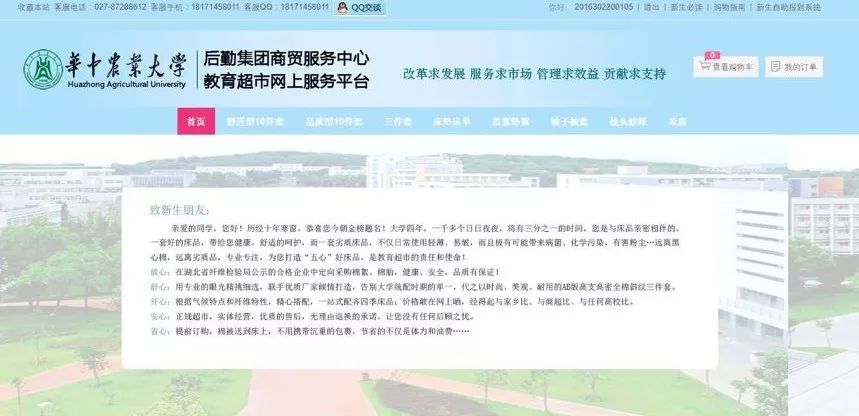
After successful registration, if freshmen need to buy apartment supplies, they can click "Apartment Supplies Purchase" to purchase daily necessities from the online shopping service platform of freshmen’s apartment supplies of Huazhong Agricultural University, which supports Alipay payment. The selected goods will be directly delivered to the student dormitory by the staff at the time of registration, which is convenient for students to register.
03
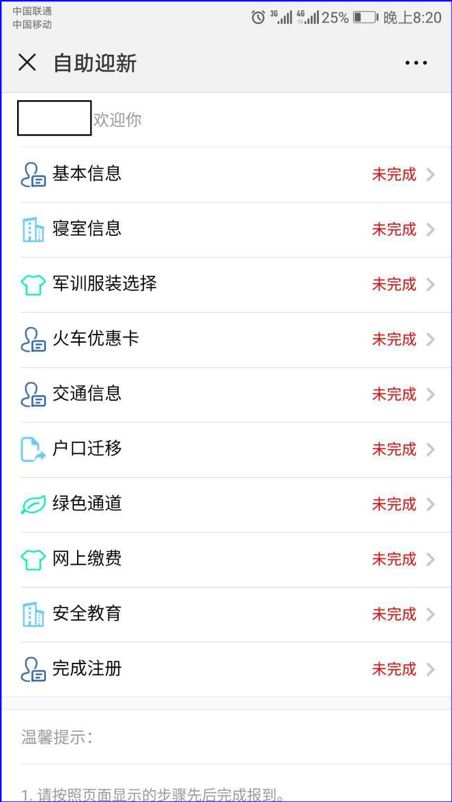
Self-service welcome system operation instructions (mobile phone WeChat end)
Tips:
1. The data on the mobile phone WeChat terminal and the computer terminal are synchronized in real time, and the welcome session is exactly the same.
2. The mobile phone WeChat does not support online payment for the time being.
3. The mobile phone WeChat terminal does not support safety education and learning for the time being. If you need safety education and learning, please download the app or visit the PC-side welcome system for learning.
Please log in and fill in relevant information in time.
And complete the corresponding safety education as required.
We are waiting for you at the foot of Lion Mountain!

Text | Undergraduate College Tamia Liu
Figure | Undergraduate College
Edit | Tamia Liu
Audit | Kuang Min
Watching